This page contains additional information for all commands listed as “Utilities” under AbettorBot’s help menu.
Arguments with (parentheses) are optional, arguments with <brackets> are required.
Some images may be a bit small and hard to read, but the point of the images is more to give a reference of what the output is than anything.

a!poll (message)
AbettorBot automatically reacts with thumbs up, thumbs down, and shrug emotes. Useful for polling of serious topics or complete jokes.

a!birthday
With no arguments, this command checks what your birthday is currently set as.

a!birthday <month> <day>
This sets your birthday for AbettorBot. If a server you’re in has the birthday system set up, you’ll get a special role and announcement for your birthday.

a!birthday <@user>
This allows you to check someone’s birthday, if they have it set with the bot.

a!reminder <time> <message>
Allows you to set reminders for times up to just under one year. Times are formatted as #d#h#m#s, such as 4d12h23m34s or 15h2m, etc.

a!ping
A straightforward utility that will respond with an embed containing the internal delay reported by Discord, a comparison between AbettorBot’s system clock and the creation time of your message, and then the duration of time it took AbettorBot to actually respond to your message.

a!reminderlist
AbettorBot can tell you what reminders you have set, how long until they go off, and where you set them. You can only check reminders that YOU have set, not other people’s reminders.

a!userinfo (@user)
AbettorBot reports back the ID, join date, server join date, username, discriminator, and avatar of either you or the person you mention.

a!randomnumber <lower> <upper>
AbettorBot will generate a random number between 0 and 1000 when given no arguments, or a random number between your defined bounds.

a!currenttime
Gives you the current time as known by the bot, based in Louisiana (CST.)

a!botinfo
A command that tells you a little bit about the bot, and also provides you the link to the website. Nothing special.
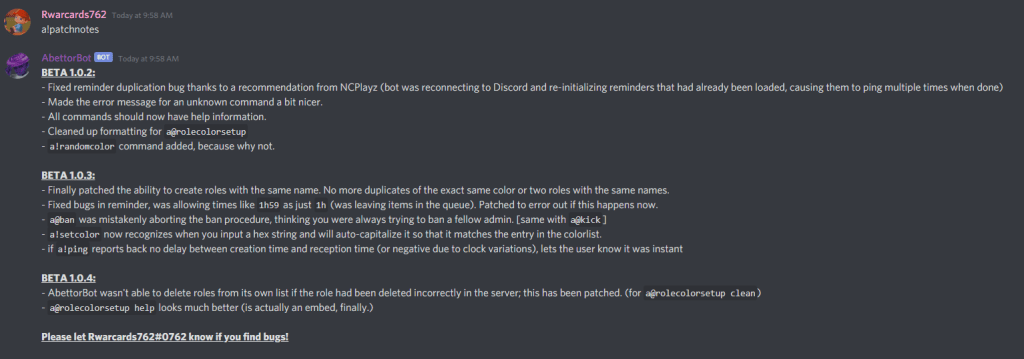
a!patchnotes
This command will tell you all the latest feature updates and patches in AbettorBot. Of course, this command’s contents will change often, and is the absolute BEST way to see what’s new.

a!roleinfo <RoleName>
This command gives you basic information about a role (don’t need to ping the role, simply type the name) including the ID and Color Hex. The embed’s color also matches that of the role, so you can preview what a color looks like in this way for a role that already exists.

a@admincheck
Allows you to see if you are an AbettorBot admin for the server. Requires the ‘a@’ prefix, but can be run by anyone.
Some extra notes for the curious:
Users could configure their announcements/etc channel to disallow Reactions by standard users. However, by Discord’s nature, if a reaction already exists on a message, any user can also add that reaction. By using this workaround, admins of a server could theoretically use ‘a!poll’ in that channel, forcing users to only be able to use the three reactions provided by AbettorBot.
The a!ping utility actually proves to be one of the best ways to see how slow Discord is responding, based on the last statistic. This last statistic is the sum of the time required to receive your message, process it, and send a response. This method is much more real to life, as compared to the often inaccurate Discord “reported latency.” There have been times where the Discord API showed 0.2s latency but the real latency of send/receive was over 20 seconds. Plus… wouldn’t it make more sense to see the delay of actually interacting with a bot, not just some backend delay time?
Other aliases of some of these commands exist, and can be found in AbettorBot’s help menu. Some examples include ‘a!rem’ for ‘a!reminder’, ‘a!time’ for ‘a!currenttime’, and ‘a!remlist’ for ‘a!reminderlist’.
 AbettorBot